
Buyer’s guide
Best Appliance Repair Scheduling Software in 2026: 14 Tools, Judged on the Second Visit
By Oleg Goriachev — owner, Cactus Appliance, Orange County, California; founder, Taskrol. Last reviewed . Each vendor carries the date its own pages were read, at the bottom.
The short answer
For ten or more technicians, ServiceTitan: dispatching and capacity planning are first-class, and technicians can check stock and reserve materials from the field, which is what closes the second visit. For a warranty-heavy shop with a Windows back office, Rossware (ServiceDesk). For one to five technicians doing retail work, Taskrol: the calendar and the map together, and the van stock visible from the job before the technician leaves the kitchen. Housecall Pro has the best dispatch surface of the generalists but publishes nothing about the job that waits on a part. If skill-based assignment is your first filter, Smart Service and LayCor publish it and we don't.
I own Cactus Appliance in Orange County, California. Three technicians, about 150 jobs a month, and a part needed on close to every call. I also built Taskrol, and the shop runs on it, so read this the way you'd read any vendor's ranking: looking for whether I'm harder on my own product than on the others. Its gaps get their own paragraph, its rank is argued, and every other product gets something named that it does better.
This is the second roundup I've written. The first judged the whole category on where the appliance record lives. This one asks a scheduling question, and it turns out to be a different question from the one the vendors answer on their scheduling pages.
Same rules as before. Facts about other vendors come from their own pages, read on the date next to each name. No prices, because a price goes stale inside a quarter. Where a vendor's pages say nothing about something, the table says “Not published,” and that is all it means. It's not a missing feature. It's a question for the demo.
The test: what happens to the job that's waiting on a part?
Every scheduling product in this category is sold on filling the calendar. Online booking, reminders, drag-and-drop, drive time. That's the first visit, and every product on this list does it well enough that it won't be the reason you pick one.
In appliance repair the first visit is often not the whole job. A part is needed on close to every call. The technician diagnoses, the customer approves the estimate, and if the part isn't on the truck, the job goes to In Progress and waits. It doesn't close and it doesn't get a new record. It sits there until the part lands.
Here is how that runs at Cactus. If the part is on the truck or on the shelf, the repair finishes on the first visit. Sometimes, depending on the schedule, the technician drives to the supply house and installs it the same day. As a rule, the install happens the next business day.
Next business day is the number this whole article turns on. It's achievable because the shop knows what stock it owns before the technician leaves the customer's kitchen. He searches the part on the job, sees whether it's in his van or in the warehouse, and books the return visit while he's still standing there. The scheduling question turned into an inventory question the moment the part became the thing the calendar was waiting for.
Nobody loses these jobs. Everyone in this trade runs a CRM and everyone tracks the open job; when it goes wrong, a person made a mistake, not the system. So this is not a scare story about forgotten work. The tracking is solved. What varies between shops, and between products, is the speed: how fast the part gets found, and how fast the job gets from In Progress back onto the calendar.
That's the test. Not whether it schedules. They all schedule. What does the product do with the job while it waits for a part, and how many screens does it take to put that job back on the calendar once the part is in hand?
There's a second question, and it decides who gets the first visit. At Cactus, assignment is skill first and geography second. If two technicians can both do the work, the closer one goes. But some jobs only certain technicians can do. Compressor brazing. Sealed-system work. Send the nearest technician to a sealed-system job and you've bought a second truck roll. Most dispatch marketing is about drive time, so the table has a column for what each product says it assigns by.
The table
Shape, not prices. “Not published” means the pages I read don’t mention it; it doesn’t mean the feature doesn’t exist.
| Product | Booking and dispatch | Assignment by | Arrival window and texts | Route optimization | The waiting job | Runs on |
|---|---|---|---|---|---|---|
| 1. ServiceTitan | Dispatching and Capacity Planning, first-class on the appliance page | Not published beyond capacity planning | Not published | Not published on the pages read | Technicians check stock and reserve or request materials; per-location replenishment | Web, iOS, Android |
| 2. Rossware (ServiceDesk) | DispatchLinks creates jobs from twelve warranty networks; dispatch board not published | Not published | Not published | Yes, metered per use | Special orders raised from the field against per-truck and stock-room stock | Windows desktop; hosted Windows Server; tech app on iOS and Android |
| 3. Taskrol | Online booking or Quick Job lands on the calendar and the map together; office reschedules on web | Technician, ZIP and service area; the skill call is the dispatcher's | Customer picks the arrival window at booking; automatic ETA text when the tech is on the way | No. The dispatcher orders the day from the map | Stays In Progress; parts search shows the van cell and the warehouse; shopping list | Web, iOS, Android |
| 4. Housecall Pro | Online booking; dispatch to the closest technician | Closest technician | Reminders; arrival window not described | Yes, top tier only | Not published; flat-rate price book, no stock | Web, iOS, Android |
| 5. MeraFix | Dispatch calendar; 24/7 AI receptionist and call tracking feed it | Not published | Two-way SMS; arrival window not described | Not published | “Parts on the way” return-visit flow | Web; native iOS technician app |
| 6. ApplianceOps | Home-warranty dispatch emails parsed into work orders; dispatch board not published | Not published | Not published | Not published | Open invoices roll up into a Parts-to-Order list; purchase orders; stock ledger | Browser, Android app, iOS as web app; full offline |
| 7. Smart Service | Inventory visibility before dispatch; dispatch board not published | Skill-based technician assignment | Not published | Not published | Inventory visibility before dispatch; depth not published | Cloud or Windows desktop; iFleet app on iOS and Android |
| 8. Jobber | Client Hub, where customers see appointments; dispatch board not published | Not published | Client Hub shows the appointment; window and texts not described | Not published | Not published; no parts or inventory described | Web, iOS, Android |
| 9. Workiz | Built-in phone system; Genius AI Answering books callers 24/7; Angi, Thumbtack, and LSA wired in | Not published | Calls, texts, and emails in one dashboard; window not described | Not published | Purchase-order tracking for back-ordered parts; inventory and POs on the top tier | Web, iOS, Android |
| 10. LayCor | Booking page where the customer picks appliance type and brand; dispatch from the booking | Technician specialty and brand certification, at the moment of booking | Not published | Not published | Parts tracked per truck; nothing on the wait | Browser-based mobile, no app-store install |
| 11. Service Fusion | Scheduling and a customer web-booking portal | Not published | Pre-job texts; window not described | Not published; GPS fleet tracking is an add-on | Not published; inventory arrives on the middle tier | Web, iOS, Android |
| 12. Orcatec | Dispatching and scheduling, on the free version | Not published | Not published | AI route optimization published; which plan carries it isn't stated | Spare-parts inventory and a supplies order named; nothing on the wait | Web, iOS, Android |
| 13. ServiceM8 | Not published; free plan with one user and a monthly job cap | Not published | Not published | Not published | Not published; no parts or inventory described | iPhone first; Android “Lite” |
| 14. QuoteIQ | InstaSchedule booking where the customer picks appliance type; Virtual Call Team captures the call | Not published | Not published | Yes, on the Elite tier and up | Parts logged to the job for costing; inventory on upper tiers; nothing on the wait | Web, iOS, Android |
How I judged them
Two products are first-hand: Housecall Pro, which Cactus ran on before Taskrol existed, and Taskrol, which it runs on now. Everything else is read from the vendor's own pages on the date shown and labelled that way. Where a vendor's pages say nothing about arrival windows, or assignment, or the waiting job, the cell says “Not published.” It means I didn't find it. It doesn't mean the product can't do it, and you should ask in the demo.
The order is a judgment, not a score: how many appliance shops each product is the right scheduling answer for, weighted by the second visit first, assignment second, and the first-visit surface third. That's why the order here differs from the first roundup. A product can be a poor home for the appliance record and still be a strong dispatcher, and the reverse.
The list
1. ServiceTitan
Documentation-based · pages read
ServiceTitan's appliance page leads with Capacity Planning and Dispatching as first-class features, next to Pricebook, Timesheets, Custom Forms, Service Agreements, Job Histories, and Purchasing & Inventory. It's priced per technician, sold by quote through a demo, and built for a business with an office. 100,000+ trade professionals, they say.
It's first here because it's the only product on the list that publishes both halves of this article's test. The dispatch half is obvious. The second-visit half is the inventory: multiple locations across trucks and warehouses, and technicians who can check stock and reserve or request materials from the field. That is the mechanism that gets a job from In Progress back onto the calendar without a phone call to the office.
- Where the appliance lives
- In job histories and equipment records. For scheduling, the part matters more than the record: stock lives in per-location lists across trucks and warehouses with automatic replenishment, purchase orders, transfers between locations, and barcode receiving, and a technician can reserve a part against a job while he's still at the customer's house.
- Better than Taskrol
- Capacity planning for a real office, and a technician who can reserve or request materials from the field against multi-location stock. I show the technician what's on the truck and in the warehouse; I don't publish a reservation or a request that a purchasing person acts on. Purchase orders, vendor returns, transfers, and QuickBooks Desktop Premier and Enterprise on top.
- Watch for
- Three packages, Starter, Essentials, and The Works, with mobile estimates above Starter and advanced reporting, commission tracking, and memberships on the top one, plus Pro products layered above that. Route optimization isn't on the appliance page I read, so ask which package carries it. For a two- or three-tech shop the per-technician price and the implementation buy capacity you'll never use.
- Pricing shape
- Per technician, quote only, three packages plus Pro add-ons. Their pricing page →
- For
- Ten-plus technicians, a dispatcher who plans capacity, and a warehouse someone owns.
2. Rossware (ServiceDesk)
Documentation-based · pages read
Rossware is the incumbent. ServiceDesk was designed by an appliance repair company owner, the site claims 30+ years, and the copyright line now reads Fullsteam Software Holdings, so it has been acquired. The core is a Windows desktop application, by their own FAQ, hosted on a Windows Server they'll rent you if you want it from anywhere. The technician app runs on iOS and Android.
On this article's test it publishes the right answer. A technician can raise a special order from the field, and stock is kept per truck and per stock room with minimum quantities. That is the waiting job handled the way this trade handles it: the part gets ordered from the kitchen, against what the shop already owns. Route optimization is published too, metered per use.
- Where the appliance lives
- In the job history and the inventory, keyed to machine type and make. For the second visit, what matters is that the part on the truck, the part in the stock room, and the special order raised from the field all live in one system, and that a warranty dispatch arriving from one of twelve named networks becomes a job automatically with status pushed back.
- Better than Taskrol
- Warranty dispatch, and it isn't close: twelve named networks through DispatchLinks, jobs created automatically when a dispatch lands, status pushed back. A metered route optimizer I don't have. Thirty years of this trade's edge cases in the workflow. And special orders a technician raises from the field, which I approximate with a shopping list rather than a purchasing document.
- Watch for
- The dispatch board, arrival windows, assignment rules, and customer texts aren't described on the pages I read, so ask to see the day run end to end. The technician app, DispatchLinks, SD-CyberOffice, SD-Dealer, SmartParts, and hosting are separately priced add-ons, route optimization is metered per use, and there's no direct QuickBooks integration, exports only.
- Pricing shape
- Flat monthly core, per-user technician app, itemized add-ons, route optimization metered per use. Their pricing page →
- For
- A warranty-heavy shop dispatched through the networks, with a Windows back office and someone who owns the configuration.
3. Taskrol
First-hand · pages read
I built it and Cactus runs on it, so I'll describe what it does and then where the documentation of the two products above beats it.
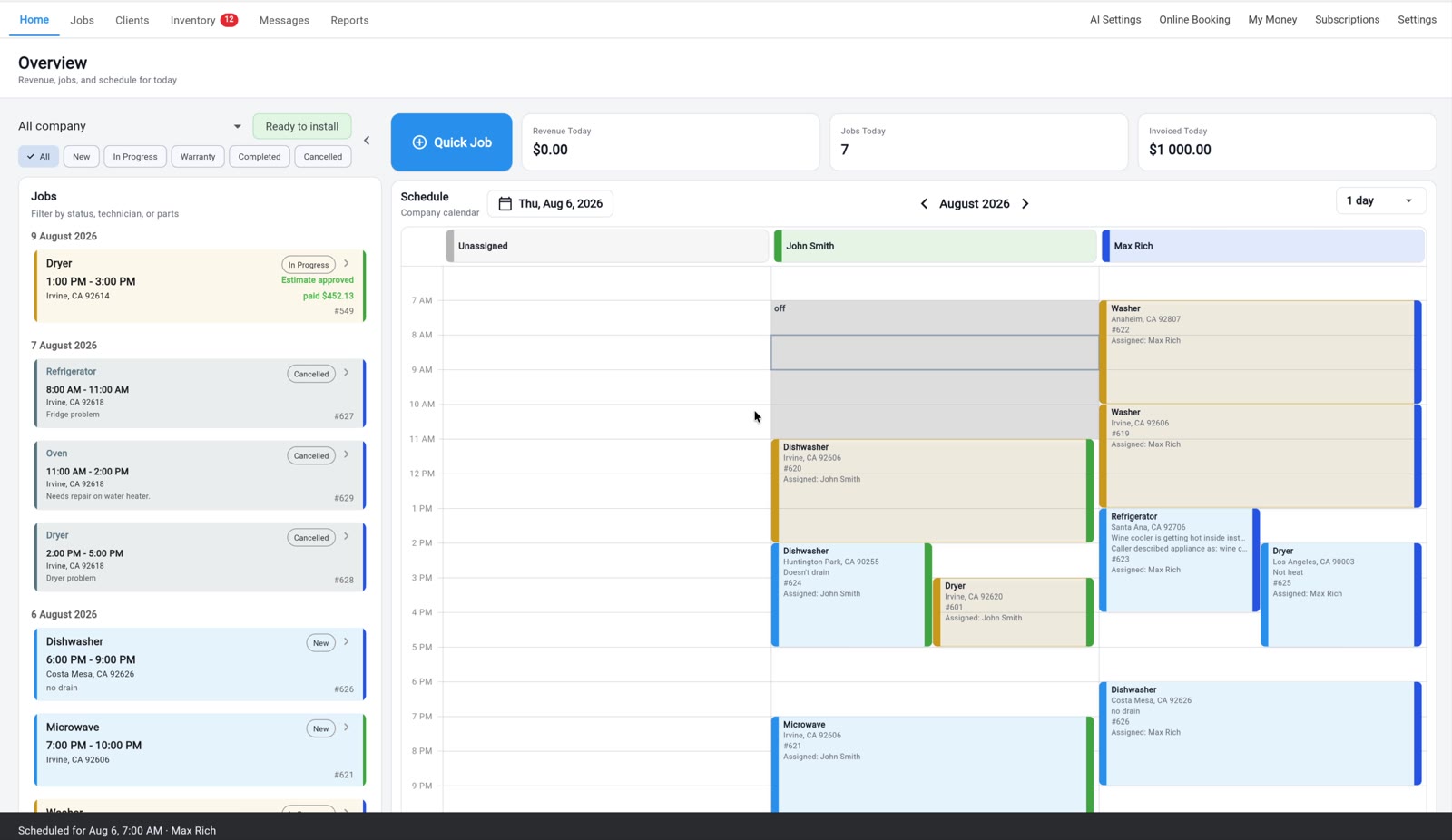
A job arrives from online booking or as a Quick Job and lands on the calendar and on the map at the same time. I assign by technician, ZIP, and service area. The technician sees his day on the phone with the schedule and the map on one screen. Office staff reschedule from the web by dragging the card. The customer picks an arrival window at booking and gets an automatic ETA text when the technician is on the way.
The part is where it earns its place here. When a technician on a job searches the part, the result shows what's already in his van, by cell, and what's in the shared warehouse. If it's there, the job finishes today. If it isn't, the part goes on the shopping list and the job stays In Progress on the same board, and it gets booked back onto the calendar for the next business day. No separate queue, and nobody whose job is to watch one. The technician tracks his own part, the way he would anyway.
- Where the appliance lives
- On the job and in the customer's history; the appliance record is the first roundup's subject and I won't repeat it. What it does to the schedule: the model number drives the parts search, the search shows the van cell and the warehouse, so the technician knows before he leaves the kitchen whether today is the last visit. A warranty callback goes on the calendar like any other job. It's linked to the original job and kept out of the revenue statistics, and that is the one thing about callbacks that's different here.
- Better than the rest of this list
- The map and the calendar on one screen, with the van stock a tap away from the job, so the return visit gets booked from the customer's kitchen with the part already located. The callback linked to its original job and kept out of the revenue numbers. I didn't find the map, the calendar, and the technician's own van stock published as one workflow anywhere else on this list.
- Watch for
- No route optimization. The scheduling page describes a map and a calendar, assignment by technician, ZIP and service area, and an automatic ETA text. It does not describe a router that orders the day for you. Orcatec, Housecall Pro on its top tier, QuoteIQ on its top tier, and Rossware, metered per use, all publish one. For three trucks in one county a dispatcher's head beats a router. My guess is that stops being true around six trucks, or the day you cross into a second county, and at that size you should buy a router elsewhere. Skill-based assignment is thin: our page mentions assigning by technician, location, and skill in one line, and the described workflow is ZIP and service area. At Cactus the skill call is made by a person who knows the crew. Smart Service publishes skill-based technician assignment and LayCor publishes dispatch by technician specialty and brand certification at booking, and both are ahead of us on the thing I actually dispatch on. Then the standing list: no QuickBooks in either direction, no OEM or home-warranty network dispatch, reporting trimmed on the free plan, design behind the funded incumbents, and almost no public reviews because we're new.
- Pricing shape
- Solo is free: one technician, one company, unlimited jobs, no card. Basic is a flat monthly price for one seat; Pro is a flat monthly price with three users included, not per seat. SMS is unlimited. The shared warehouse and the company-wide shopping list are Pro; a personal shopping list is on Solo. Their pricing page →
- For
- A retail and COD shop of one to five technicians where a part is needed on most calls and the return visit has to happen the next business day.
Why third and not first: ServiceTitan publishes a technician reserving stock from the field and Rossware publishes a special order from the field, and both publish a router. I show the technician the stock and let him order it, and I don't publish a router at all. Why third and not lower: below this line, MeraFix publishes a return-visit flow and Smart Service publishes inventory visibility before dispatch, but I didn't find either one showing the technician what's on his own truck from the job, and that's what makes next business day routine rather than lucky.
4. Housecall Pro
First-hand · pages read
Cactus ran on Housecall Pro before Taskrol existed, so this one is first-hand, though I haven't used it since and the documentation is what I'm judging today. It has the strongest dispatch surface of any generalist here for a small shop: online booking, dispatch to the closest technician, reminders, and route optimization on the top tier, alongside a marketing suite nobody else but MeraFix matches.
On the test it's silent. The appliance page describes a flat-rate price book and no stock, and nothing on the pages I read says what happens to a job that's waiting on a part. That is not the same as saying it can't be done. It means it isn't what the product is sold on.
- Where the appliance lives
- In Property Profiles, an opt-in app under My Apps that records item type, make, model, serial, and install date per address. From the documentation, the record doesn't connect to parts or stock, and the appliance page describes a flat-rate price book with no inventory. So the pages I read say nothing about the job that waits for a part.
- Better than Taskrol
- Dispatch to the closest technician and route optimization on the top tier, which is the router I don't have. Online booking, reminders, review management, marketing campaigns, a website product, Instapay deposits, and a published card-processing rate that undercuts ours. If the phone isn't ringing, it has more tools for that than anyone here except MeraFix.
- Watch for
- Route optimization, recurring service plans, and API access sit on the top tier, and GPS is an add-on, so the dispatch you saw in the demo may be two tiers up from the one you're quoted. Basic includes one user; Essentials and Max include a block of seats with additional users billed monthly, so count your dispatcher. From my own time on it, simple things take too many operations: opening a job, creating a customer. And nothing on the pages I read says what happens to the job waiting on a part.
- Pricing shape
- Three tiers with seats included, extra seats billed, many add-ons, 14-day trial without a card. Their pricing page →
- For
- A multi-trade home-service business where the first visit is most of the job and the router matters more than the stock.
5. MeraFix
Documentation-based · pages read
MeraFix is “all-in-one for appliance repair” and means it literally: the CRM, the dispatch calendar, a native iOS technician app, invoicing through Stripe, a branded website with “150+ local SEO pages,” Google Ads tracked “down to the PAID job,” call tracking, two-way SMS, review requests, and a 24/7 AI receptionist, on one bill. MeraFlow LLC, Fort Mill, South Carolina; they say it's running live in US repair shops.
It's fifth because it's the one competitor that states this article's thesis on its own home page. There is a “parts on the way” return-visit flow. A vendor that writes that down understands that the job doesn't end on the first visit. What the pages don't describe is stock, so I can't tell you whether the flow knows what the shop already owns. Ask.
- Where the appliance lives
- With the customer, as repair history and warranties, per the home page. For the second visit, the published piece is the “parts on the way” return flow with parts cost tracking hidden from the customer. Nothing on the pages describes truck or warehouse stock, so where the part comes from is a question for the demo rather than a fact I can print.
- Better than Taskrol
- Customer acquisition as part of the product: the website, the local pages, the ads tracked to the paid job, and the phone answered at two in the morning by an AI receptionist. White-glove setup with data migration included. A native iOS technician app. And a return-visit flow with a name, which is more than my board gives it.
- Watch for
- QuickBooks Online sync is listed as “coming soon.” The technician app is iOS only. Assignment rules, arrival windows, and route optimization aren't described on the pages I read. The technician-count bands start at a level that assumes marketing is part of what you're buying, and the website and local pages are rented, so ask in writing what ports out.
- Pricing shape
- Flat monthly by technician band (1–3, 4–7, 8–12, custom), everything bundled, AI minutes vary by band, managed Google Ads as an add-on, month-to-month, CSV export anytime. Their pricing page →
- For
- A shop whose real problem is the phone not ringing, and that wants the return visit to be a named flow rather than a note.
6. ApplianceOps
Documentation-based · pages read
“The CRM built only for appliance repair,” by a technician with nearly two decades in the trade, aimed at a one-man operation up to a five-person store with a parts counter. The pages I read don't describe a dispatch board, an assignment rule, or an arrival window. What they do describe is the second visit, and they describe it properly.
Every open invoice rolls up into a Parts-to-Order list, parts run through an append-only stock ledger, and purchase orders are there. And the whole app works offline, which matters more for scheduling than it sounds: the schedule gets read in the basement where the machine is, not in the driveway after the technician walks out for a signal.
- Where the appliance lives
- On the invoice, one block per machine, with a service history per machine. For the waiting job, the published mechanism is the roll-up: an open invoice with a part on it lands on the Parts-to-Order list, the part is bought on a purchase order, and margin is tracked when the invoice closes. That's the queue the technician at Cactus keeps in his head, written down.
- Better than Taskrol
- Full offline work: invoicing, payment capture, and signatures with zero bars, which I don't publish. Home-warranty dispatch emails from AHS, First American, Choice, and ServicePower parsed into work orders, with split billing. A Parts-to-Order list that's a purchasing document rather than a shopping list, and a QuickBooks Online sync, nightly.
- Watch for
- The field app is Android from Google Play, or a browser install on anything else, with no native iOS app. Dispatch board, assignment, arrival windows, customer texts, and routing aren't on the pages I read, so the first-visit half of this article is a demo question. It's a small team by its own description, and I found no independent reviews on their pages. I haven't run it.
- Pricing shape
- A base price plus a per-seat charge, capped for a five-person shop, then per seat beyond; every feature on every plan; phone system as a separate add-on; no cut of card payments. Their pricing page →
- For
- A one-to-five-tech shop doing home-warranty work whose technicians read the schedule in basements.
7. Smart Service
Documentation-based · pages read
Smart Service calls itself a QuickBooks add-on rather than an integration, “built around QuickBooks, not bolted onto it,” with a cloud version that works with QuickBooks Online or Desktop and a desktop version that installs beside QuickBooks Desktop. iFleet is the technician app, on iOS and Android.
It's here, above the generalists, for two lines on its appliance page: skill-based technician assignment, and parts inventory visibility before dispatch. Those two lines are exactly what I dispatch on. Skill first, so the sealed-system job goes to the technician who can braze. Stock second, so the dispatcher knows whether the job can finish today before the truck leaves. I can't tell you how deep either goes, because the page doesn't say, and I'd want to see both run on one job in a demo.
- Where the appliance lives
- Per unit, properly: make, model, and serial per washer, dryer, refrigerator, range, and dishwasher, with service history, warranty status, parts usage, fault codes, and model-plate photos captured at the job. For scheduling, the useful sentence is inventory visibility before dispatch. How the waiting job is handled once the part is ordered isn't published.
- Better than Taskrol
- Skill-based technician assignment, published as a feature, where my page mentions skill in one line and the workflow is ZIP and service area. Inventory visibility before dispatch, stated as a dispatch feature, where mine is a parts search from the job. And the accounting seat: if your bookkeeper's whole world is QuickBooks Desktop, this is built for that person.
- Watch for
- Pricing is quote-based, and the quote bundles onboarding and data conversion with support renewed annually, so you can't size it from the website. Arrival windows, customer texts, route optimization, and the dispatch board aren't described on the pages I read. Skill-based assignment and inventory before dispatch are single sentences; make the demo show both on one job.
- Pricing shape
- Quote-based subscription, Standard or Enterprise, annual discount, onboarding included; a desktop licence option exists. Their pricing page →
- For
- A shop that dispatches on skill and on stock, whose books already live in QuickBooks.
8. Jobber
Documentation-based · pages read
Jobber is the best-reviewed app in this category by its own numbers, a 4.8 App Store rating across nearly 14,000 reviews on the appliance page, and it's famously easy to live in. Hiring a dispatcher who already knows it is easy, which is a scheduling feature nobody prints.
On the appliance page, the specifics this article asks about aren't there: I found no assignment rule, no arrival window, no router, and nothing about a job waiting on a part. What is there is Client Hub, the portal where the customer sees the appointment, approves the quote, and pays without calling you. For the customer half of scheduling, that's as good as it gets on this list.
- Where the appliance lives
- In custom fields on clients, properties, quotes, jobs, and invoices, text, number, or dropdown, available on select plans, with no equipment module. The appliance page describes no parts or inventory, so the waiting job has no published mechanism beyond the job record itself. That's not a criticism of the calendar. It's where the calendar stops.
- Better than Taskrol
- Client Hub, the 24/7 portal where customers approve quotes, see appointments, and pay, which is a better customer half than my booking page and ETA text. Quotes with optional line items the customer picks from. A QuickBooks Online sync on the Connect tier and up. And the sheer number of people who've already learned it.
- Watch for
- Core includes one user; Connect, Grow, and Plus include blocks of five, ten, and fifteen with additional users billed monthly. Job costing sits on Grow. The AI receptionist and marketing suite are add-ons or Plus. The appliance is a custom field on select plans, and the pages describe nothing about parts, so bring your own answer to the second-visit question and ask them for theirs.
- Pricing shape
- Four tiers with seats included, extra seats billed, annual discount, 14-day trial of Grow. Their pricing page →
- For
- A small team that wants the smoothest customer experience on the first visit and doesn't need the system to know the part.
9. Workiz
Documentation-based · pages read
Workiz's appliance page is about the phone: a built-in system with calls, texts, and emails in one dashboard, Genius AI Answering that books emergency callers 24/7, and a line that says it's “fully integrated with Angi, Thumbtack, and Google's Local Services Ads.” 120,000+ pros, they say. Dispatch here starts with the ring.
On the second visit it publishes one specific thing: purchase-order tracking for back-ordered parts. That's the waiting job with a document attached, which is more than most generalists say. The catch is the tier. Inventory and purchase orders both sit on Ultimate, so on the lower tiers the pages describe neither.
- Where the appliance lives
- Nowhere described; the appliance page doesn't mention make, model, or serial. For the waiting job the published mechanism is purchase-order tracking for back-ordered parts, and inventory that tracks which parts are in stock and what's running low, both on the Ultimate tier. Below that tier the pages describe the phone and the leads, not the part.
- Better than Taskrol
- Lead-source integrations and the phone system: if Angi and Thumbtack are where your jobs come from, Workiz wires them in and records the call against the job, and Genius AI Answering books the emergency caller at night. Purchase-order tracking for back-ordered parts, which is a document I don't have. QuickBooks sync on every tier.
- Watch for
- The appliance-relevant modules, inventory and purchase orders, are top-tier; custom reports start at Pro; Genius Phone, Answering, and Marketing are add-ons. Assignment rules, arrival windows, and routing aren't on the appliance page I read. The trial is seven days, which is not enough to watch one part come back and get installed.
- Pricing shape
- Standard, Pro, Ultimate; feature-gated; add-on Genius products; seven-day trial. Their pricing page →
- For
- A shop that lives on marketplace leads and wants the phone inside the CRM, on the tier that includes the parts.
10. LayCor
Documentation-based · pages read
LayCor is a booking-and-scheduling platform for service businesses generally, 60+ industry solutions from HVAC to lawn care, with an appliance repair solution page on top. Flat monthly plans with unlimited team members, browser-based mobile with no app-store install, QuickBooks Online sync, a 14-day trial, and a 30-day money-back window.
It has the best published answer on this list to the assignment question. At booking, the customer picks the appliance type and the brand, and dispatch can assign by technician specialty and brand certification right there. That is skill first, geography second, written into the product, and it's ahead of what I publish. It's tenth rather than higher because it's a general booking platform with an appliance template, and the pages say nothing about the job waiting on a part beyond parts tracked per truck.
- Where the appliance lives
- With the property: brand, model, service history, and warranty status captured at booking, when the customer picks appliance type and brand. Parts are tracked per truck. That's enough to route the sealed-system job to the technician certified for the brand; what happens after he orders the part isn't described.
- Better than Taskrol
- Dispatch by technician specialty and brand certification at the moment of booking, which is the skill-first assignment I do by hand and they do in the product. Unlimited team members at a flat price, and a booking page that carries the brand straight into the assignment.
- Watch for
- The outcome numbers on the page, “35% more bookings in month one” and “cut admin time by 60%+,” are claims I can't check any more than you can. The appliance layer is a template on a general product. Arrival windows, customer texts, routing, and the waiting job aren't described on the pages I read, so ask to see one job go from booking through a back-ordered part before the booking widget wins you over.
- Pricing shape
- Flat, unlimited users, add-ons, trial, money-back window. Their pricing page →
- For
- A small crew that wants the brand-certified technician chosen at booking, and a branded booking page that works at midnight.
11. Service Fusion
Documentation-based · pages read
Service Fusion's pitch is the seat count: “no per-user fees means your costs stay the same even as your business grows.” The appliance page covers scheduling, estimates, a customer web-booking portal, pre-job texts, eSignature, and payments, with GPS fleet tracking and ServiceCall.ai, which is call recording, transcription, and routing, as add-ons.
Pre-job texts and a web-booking portal are a decent first visit. The second visit isn't on the page. Inventory management arrives on the Plus tier, and nothing I read says what the product does with a job that's waiting on a part, so it's here on the strength of the office it's built for: flat price, unlimited users, dispatchers who outnumber technicians.
- Where the appliance lives
- Not on the appliance page, which has no make, model, or serial and no parts. Equipment tracking appears elsewhere in their feature marketing, and I couldn't find what a record holds. Inventory and job costing arrive on Plus, and the waiting job isn't described, so a three-tech shop should ask the demo to show a back-ordered part from estimate to install.
- Better than Taskrol
- Unlimited users at a flat price, so three technicians and two office people pay the same as three technicians alone, which beats my seat-priced plans once the office grows. Bi-directional QuickBooks sync of customers, products, services, deposits, invoices, and payments. Pre-job texts and a customer web-booking portal, with onboarding and unlimited phone support on every plan.
- Watch for
- The flat price is a flat price for a full office; for a two-tech shop it's a lot of seats you don't have. Assignment rules, arrival windows, routing, and the waiting job aren't described on the pages I read, and no free trial is mentioned, so the demo is the only way to see the second visit.
- Pricing shape
- Flat, unlimited users, three tiers, annual discount, add-ons for VoIP and GPS. Their pricing page →
- For
- An office-heavy shop where dispatchers outnumber technicians and the books live in QuickBooks.
12. Orcatec
Documentation-based · pages read
Orcatec is “All-In-One Home Services Management Software” from Rancho Santa Fe, California, fifteen trades including appliance repair, with a free version. The appliance page describes custom data-entry forms, a spare-parts inventory, a supplies-order feature, QuickBooks Online, GPS, call recording, and AI route optimization.
It publishes an AI route optimizer and a free plan that includes dispatching and scheduling, which is more routing than I give away on Solo or sell on Pro. Which plan carries the router, the pages I read don't say. The reason it's twelfth is the rest of the test: no assignment rule, no arrival window, and nothing about the waiting job on the pages I read, and a spare-parts inventory described in one phrase. The pricing page is a contact form.
- Where the appliance lives
- In a custom form on the job, with fields for problem description, model, and serial number. A step above a text note and a step below a record with history. The spare-parts inventory and the supplies order are named on the appliance page and not described further, so what the product does while a job waits for a part is a demo question.
- Better than Taskrol
- A free plan that includes dispatching and scheduling, GPS, call recording, commissions, and QuickBooks Online, none of which I bundle at zero, and a published AI route optimization that I don't have on any plan.
- Watch for
- The pricing page is a contact form, and the site says you pay only for the features you pick, which is a reasonable model and an unknowable one until you ask. Which plan carries the route optimizer isn't stated on the pages I read. Assignment, arrival windows, and the waiting job aren't described.
- Pricing shape
- Free tier; paid pricing by request, modular. Their pricing page →
- For
- A shop that wants a free scheduler and QuickBooks, will ask which plan the router is on, and will build the appliance record itself.
13. ServiceM8
Documentation-based · pages read
ServiceM8 is built for “sole traders up to 20 staff,” iPhone-first, with a “Lite” Android app carrying the basics. Pricing is by job volume rather than seats: a free plan with one user and a monthly job cap, then paid plans with unlimited users and rising job limits. Xero, QuickBooks Online, and MYOB sync on every plan.
The pages I read are about the asset register and the accounting, not about dispatch. I found nothing on assignment, arrival windows, routing, or the job that waits on a part, and nothing on parts or inventory at all. That's why it's here. Not because the calendar is bad, which I can't judge, but because the vendor's own pages don't make a scheduling case an appliance shop can check.
- Where the appliance lives
- In Asset Management, an add-on from the Growing tier: asset type, location on site, custom fields, photos, a globally unique QR label you stick on the machine, and service reports from completed forms. It's designed around fire extinguishers and air conditioners on commercial sites, but it works as a per-unit record. Nothing on the pages describes parts, inventory, or the waiting job.
- Better than Taskrol
- The free tier for a one-person iPhone operation with job-volume pricing instead of seats, the QR-labelled asset register, Tap to Pay on iPhone, and three accounting integrations, Xero, QuickBooks Online, and MYOB, where I have none.
- Watch for
- iOS-first is a hard constraint for an Android technician, and the Lite app carries only the basics. Job-volume pricing means a busy solo tech outgrows Free fast. On scheduling specifically, the pages I read publish none of the dispatch specifics this table asks about, so every cell is a demo question.
- Pricing shape
- Free tier; paid tiers by monthly job volume with unlimited users; asset management, forms, and job costing gated by tier. Their pricing page →
- For
- A solo tech with an iPhone and an accountant on Xero, who'll judge the calendar in the trial rather than on the website.
14. QuoteIQ
Documentation-based · pages read
QuoteIQ's appliance page ranked first for the broader appliance software query when I wrote the first roundup, so leaving it out would look like fear. It's a flat-priced CRM for “100+ trades,” appliance repair among them, with a 4.7 rating across 4,100+ reviews on the home page and an appliance page claiming it's “60–80% less expensive than Jobber or Housecall Pro.”
For scheduling it publishes InstaSchedule, where the customer picks an appliance type and books, a Virtual Call Team that captures appliance type, issue, and address from the call, and route optimization on the Elite tier. That's a first visit. Parts are logged to the job for costing, motors, boards, pumps, thermistors, with inventory on the upper tiers, and nothing I read says what happens to the job while the part is on order. It's last because the scheduling case is a booking widget and a router on the top tier, and the second visit isn't on the page.
- Where the appliance lives
- On the booking and the job: InstaSchedule has the customer pick an appliance type, the Virtual Call Team captures type, issue, and address, and job costing logs parts against the job and reports profit by appliance type. No make, model, or serial record is described. Inventory is an Elite-and-up feature, and the waiting job isn't described.
- Better than Taskrol
- The entry price and the growth tooling: Review Multiplier, mass campaigns, consumer financing through Affirm, Klarna, and Afterpay, an AI website builder, a usage-priced AI call team that captures the appliance and the address, and route optimization on the top tier, which I don't publish at all.
- Watch for
- QuickBooks and job costing start at Pro; inventory, pipelines, and route optimization at Elite, so the scheduling features that matter here are two tiers above the entry price. MapMeasure Pro, satellite property measurement, tells you which trades this was built for first. Assignment, arrival windows, and the waiting job aren't on the pages I read.
- Pricing shape
- Five flat tiers from one user to unlimited, feature-gated, 14-day trial, price-lock guarantee. Their pricing page →
- For
- A one- or two-person shop where budget is the first filter and the router can wait for the top tier.
The second visit, step by step
Here's the sequence at Cactus on a job that needs a part, because the ranking above is really a ranking of how many of these steps a product publishes.
The technician diagnoses and the customer approves the estimate. The technician searches the part on the job. If it's in his van, he installs it and the job closes on the first visit. If it's on the shelf in the warehouse, or the supply house has it, sometimes he drives over and installs it the same day, depending on the schedule. If it isn't owned, it goes on the shopping list and gets ordered, and the job stays In Progress.
The technician tracks his own part. He knows what he ordered and he watches for it to arrive. There's no separate queue and nobody whose job is to watch one. When it lands, someone calls the customer. Who that is depends on the shop: a solo technician calls himself, a shop with an office has the operator do it, and at Cactus it goes both ways depending on the day. The return visit goes on the calendar, as a rule the next business day.
How the model number gets to the part, and why the generalists keep re-buying parts they already own, is the subject of the first roundup, and I won't repeat it here.
What I'd measure in any product is the same thing. With the part in hand, how many screens between In Progress and a slot on tomorrow's calendar, and does the technician need to call the office to get there.
Skill first, geography second
Some jobs only certain technicians can do. Compressor brazing. Sealed-system work. Those go to the person who can do them, and the map comes second: if two technicians can both do the work, the closer one goes.
That order matters because most dispatch marketing runs the other way. Closest technician, drive time, optimized routes. A router that orders the day by drive time and knows nothing about skill will send the nearest truck to the sealed-system job, and the shop pays for the second roll. Housecall Pro publishes dispatch to the closest technician. Orcatec, QuoteIQ, and Rossware publish a router. None of those pages say the router knows who can braze, and I'd ask.
Two products publish the skill half. Smart Service lists skill-based technician assignment. LayCor assigns by technician specialty and brand certification at the moment of booking, which is the best published answer on this list. Taskrol's page mentions skill in one line; in practice the skill call at Cactus is made by a person who knows the crew. That's a gap, and it's in the Taskrol section above.
Three technicians in one county is the size where a dispatcher's head beats any router. The dispatcher knows who can braze and where each truck is at four o'clock. Past that size, when the person dispatching no longer knows every technician's hands, buy the skill rule in the product. Two vendors on this list publish one.
Callbacks go on the calendar like any other job
A callback is warranty work: we repaired something, it broke again, we go back. Ours run around 3% of jobs. It goes on the calendar exactly like any other job. No special queue, no different flow.
The one thing that is different, and it's already published on our site, is that Taskrol links the callback to the original job and keeps it out of the revenue statistics, so a free trip doesn't drag the margin numbers down. That's a reporting fact, not a scheduling one, and I'm stating it once.
I didn't find callback scheduling described as a separate flow on any vendor page I read, and I don't think it needs one. Put it on the board. The board is where the job is.
The router I don't sell
Taskrol publishes no route optimization. The scheduling page describes a map and a calendar, assignment by technician, ZIP and service area, and an automatic ETA text. It doesn't describe a router that orders the day for you, because I haven't built one. Orcatec publishes AI route optimization. Housecall Pro publishes it on the top tier. QuoteIQ publishes it on Elite. Rossware meters it per use.
For three trucks in one county, a dispatcher's head beats a router, and I'd say that about any product. The map shows me the day and I order it myself. That works up to the point where the person dispatching can't hold every truck's afternoon in one head. My guess at that point is six or so trucks, or the day you cross into a second county. If you're there, buy a router. Four vendors on this list publish one and I don't.
What a three-technician shop actually pays
The sticker price and what you pay are usually different numbers, and the difference has a shape. Seats are counted separately, and the office dispatcher is often a seat too. Reporting frequently sits one tier above where the advertised price sits. The technician app can be its own line. Phone, AI answering, and marketing are add-ons almost everywhere. Card processing is a percentage nobody puts in the headline.
I’m not going to quote the other vendors’ numbers — see the rule above — so the shapes are in the table and each product’s pricing page is linked from its card. Our own number is mine to quote: Cactus runs 3 technicians and about 150 jobs a month at an average ticket of $360, so the shop turns about $54,000 a month. Taskrol Pro costs $129 a month, flat, with 3 users included — not per seat. Card processing is 3.4% + $0.30 per successful card transaction and SMS is unlimited. That’s 0.24% of revenue for the system the whole shop runs on. Hold every other product against that yardstick, because a per-seat tool at three seats plus a dispatcher lands somewhere very different.
Which one, for which shop
- Ten-plus technicians, a dispatcher who plans capacity, a warehouse
- ServiceTitan.
- Warranty-heavy, Windows back office, special orders from the field
- Rossware.
- One to five techs, retail and COD, a part on most calls, next-business-day return
- Taskrol. Solo is free; run a real week of parts jobs on it.
- Multi-trade, the first visit is most of the job, you want the router
- Housecall Pro, on the tier that carries route optimization.
- The phone answered at night and the return visit as a named flow
- MeraFix.
- Home-warranty work, technicians reading the schedule in basements
- ApplianceOps.
- You dispatch on skill and on stock, and the books live in QuickBooks
- Smart Service.
- The smoothest customer half: portal, quotes, appointments
- Jobber.
- Marketplace leads and the phone inside the CRM
- Workiz, on the tier with inventory and purchase orders.
- The brand-certified technician chosen at booking
- LayCor, after you've seen the parts side.
- More office users than technicians
- Service Fusion.
- A free scheduler and a published router
- Orcatec, once you've asked which plan the router is on.
- One tech, an iPhone, Xero
- ServiceM8, or Taskrol Solo.
- Budget first, router on the top tier
- QuoteIQ.
Whichever demo you sit through, run one test. Take a job that needed a part. Have the technician find out, from the job, whether the shop already owns it. Then say the part just landed, and count the screens and the phone calls it takes to get that job from In Progress back onto tomorrow's calendar with an arrival window. At Cactus the answer is next business day. If the demo can't show you the number, you've learned what you needed to.
Frequently asked questions
- What is the best appliance repair scheduling software for a small shop?
- For one to five technicians doing retail work, Taskrol: calendar and map together, and van stock visible from the job, so the return visit is next business day. Smart Service if you dispatch on skill and run QuickBooks; Housecall Pro if you want the router.
- How long should the second visit take when a part is needed?
- If the part is on the truck or shelf, the repair finishes on the first visit. Otherwise the install happens the next business day as a rule, or the same day if the technician can reach the supply house. Knowing your stock before he leaves makes it routine.
- Which appliance repair software has route optimization?
- Orcatec publishes AI route optimization; Housecall Pro carries it on its top tier; QuoteIQ on its Elite tier; Rossware meters it per use. Taskrol publishes none: a map and a calendar, and the dispatcher orders the day. Past six or so trucks, buy a router.
- Which scheduling software assigns technicians by skill?
- Smart Service publishes skill-based technician assignment. LayCor assigns by technician specialty and brand certification at the moment of booking. Housecall Pro dispatches to the closest technician. Taskrol assigns by technician, ZIP, and service area, and the skill call is made by the dispatcher, not the software.
- What happens to a job that is waiting on a part?
- At Cactus it stays In Progress, the technician tracks his own part, and the return visit is booked for the next business day. ServiceTitan publishes technicians reserving stock, Rossware special orders from the field, MeraFix a “parts on the way” flow, ApplianceOps a Parts-to-Order list.
- What arrival window do appliance repair shops give?
- Three hours is the market norm; some shops give two. Cactus gives three, like almost everyone. In Taskrol the customer picks the window at booking and gets an automatic ETA text when the technician is on the way. Most vendor pages I read don't state a window.
- Does Taskrol have route optimization?
- No. The scheduling page describes a map and a calendar, assignment by technician, ZIP and service area, and an automatic ETA text, not a router that orders the day. For three trucks in one county a dispatcher beats a router; at six or more, buy one elsewhere.
- How are warranty callbacks scheduled?
- Exactly like any other job: on the calendar, no special queue and no different flow. What Taskrol does differently is link the callback to the original job and keep it out of the revenue statistics, so a free return trip doesn't pull the margin numbers down.
- Is Taskrol ranked third here because the author built it?
- No. It's behind ServiceTitan, which publishes technicians reserving stock from the field, and Rossware, which publishes special orders per truck and a metered router. It's ahead of the generalists because the van stock is visible from the job and the return visit is booked from there.
Sources and check dates
Every fact about another vendor above comes from these pages, read on the date shown. Re-check one vendor, update one line.
| Vendor | Checked | Pages read |
|---|---|---|
| ServiceTitan | Appliance repair software · Pricing · Inventory software | |
| Rossware | rossware.com · Pricing · Integrations · Overview | |
| Housecall Pro | Appliance repair software · Pricing · Property Profiles · Help: Property Profile | |
| MeraFix | merafix.com · Pricing | |
| ApplianceOps | applianceops.pro · Pricing · Features | |
| Smart Service | smartservice.com · Appliance repair software · Pricing | |
| Jobber | Appliance repair software · Pricing · Help: Custom Fields | |
| Workiz | Appliance repair · Pricing | |
| LayCor | laycor.com · Appliance repair software | |
| Service Fusion | Appliance repair software · Pricing · Field service management | |
| Orcatec | orcatec.com · Appliance repair · Pricing | |
| ServiceM8 | servicem8.com · Pricing · Asset management | |
| QuoteIQ | myquoteiq.com · Pricing · Appliance repair software |
Run the test on Taskrol yourself
Solo is free forever for one technician — unlimited jobs and customers, no card. Open a job, put a model number in, and see whether the part is already on your truck.
Or read the Taskrol product page and the one-to-one comparisons.